PixelTells: Fingerprinting Rendering Operations in Canvas2D
Beyond canvas hashes: predicting pixels from rendering operations.
“What do you mean by Fingerprinting Rendering Operations?”
Canvas fingerprinting is part of the graphical fingerprinting stack, its familiar territory if you work on/against anti-bot systems or browser privacy.
Render something, read the pixels, and use the differences to learn about the environment that produced them.
Work such as Google’s Picasso already uses canvas challenges to fingerprint the software and hardware stack.
Probing the graphics stack is not new but its done with too many generalized approaches with bad precision, what I want to do here is narrow the experiment down to calculations we can understand and be able to reproduce on any environment.
We have to ask different questions, instead of asking “Have I seen this canvas output before?” we ask “Which formula could have produced these pixels?” as provenance is the best thing in “modern information” theory we must be able to track the lineage in order to trust and verify the data.
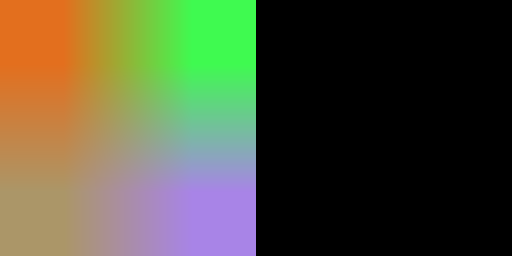
The experiment is boring: four colors, one enlarged image, no text, no fonts, no complicated geometry but that’s because we’re isolating only one aspect not many or chains.
We use the small differences introduced by interpolation and color conversion to distinguish the rendering models we have measured on AMD, NVIDIA and SwiftShader.
That’s what I mean by rendering pipeline fingerprinting, we are testing the numerical behavior of a particular part of the pipeline which is more accuracy per case but less broad generality for now.
How Canvas2D uses the hardware-accelerated rendering pipeline
Canvas2D gives us access to the hardware-accelerated rendering pipeline through drawing operations, We treat that pipeline as a black box by drawing a known image, read back its pixels, and test which formula predicts them.
For this experiment we are interested in bilinear texture filtering and conversion of the filtered color into an 8-bit pixel, In a GPU-backed image-scaling path, these operations involve texture sampling and the subsequent color precision and conversion stages.
The part we model looks like this:
2×2 source image
  -> drawImage() enlargement
  -> bilinear interpolation
  -> intermediate precision and rounding
  -> 8-bit RGB pixels
  -> getImageData()
We model the combined input-to-byte result:
Read this from the inside out: mix the source colors, convert the result to RGB bytes, and predict one output pixel.
The small m labels which model we are using: AMD, NVIDIA or SwiftShader. (x,y) is the pixel’s horizontal and vertical position in the enlarged image.
C: the input. These are the four colors we put into the tiny source image.F_m(C,s_x,t_y): mix the colors. The numberss_xandt_ycontrol how much comes from the left/right and top/bottom source pixels. Each model performs that calculation with its own precision and rounding.Q_m(...): turn the result into a pixel. Convert the filtered color into whole-number red, green and blue values from 0 to 255, using that model’s conversion rules.P_m(x,y): the prediction. This is the RGB value the model predicts at the position we chose.
The parentheses mean “use the result inside as the input to this calculation.” So F_m runs first, then Q_m. We calculate the prediction for each model and compare it with the actual pixel read from the canvas.
Keep the sample small
We write four opaque RGB colors into a 2×2 source canvas. Then we enlarge it to 256×256 at the origin of a black 512×256 destination canvas.
Tested on selected RDNA 2 / RDNA 4 and Ampere / Ada devices, plus SwiftShader. Other GPUs may not match as well as privacy protected browsers such as Brave that add noise to the canvas but a low amount of errors could still hint vendor.
Only differences shown.
The destination requests an opaque, sRGB, 8-bit context:
const context = canvas.getContext('2d', {
  alpha: false,
  colorSpace: 'srgb',
  colorType: 'unorm8',
  willReadFrequently: false,
});
The image-scaling operation is simply:
context.imageSmoothingEnabled = true;
context.imageSmoothingQuality = 'low';
context.drawImage(source, 0, 0, 256, 256);
We create a fresh canvas for every test, wait two animation frames, and read the full image once. The unused right half stays black and gives us a basic construction check.
We only compare the 128×128 interior region, from coordinates 64 through 191 on both axes, for the analyzed pixel-center mapping those positions interpolate between the four source texels without needing edge-clamping cases.
That gives us 16,384 pixels, or 49,152 RGB bytes.
Opaque colors keep alpha blending out of the calculation, Specifying sRGB and byte-valued output keeps the color format consistent. Neither setting establishes hardware execution, and willReadFrequently: false is not a command that forces the GPU.
The formulas we are testing, and the experiment results
All three formulas predict one channel at one pixel, We apply them independently to each color red, green and blue. See the formulas.
Let a,b,c,d be the four source channel bytes, ordered top-left, top-right, bottom-left, bottom-right. At a tested pixel (x,y), our integer sampling weights are:
S = 2*x - 127
T = 2*y - 127
The corresponding fractional weights are S/256 and T/256, for instance, at x = 64, the horizontal weight is 1/256 at x = 191 it is 255/256.
Ordinary bilinear interpolation combines the four colors with weights that add up to one. Writing the same calculation with integer weights gives:
N = (256-S)*(256-T)*a
  + S*(256-T)*b
  + (256-S)*T*c
  + S*T*d

ideal_byte_value = N / 65536
That is our starting point, The interesting part is what an implementation rounds, truncates or normalizes before the final byte comes out.
We only need three rounding operations explained as below:
F32(v): round to float32, nearest with ties to even. In JavaScript, this isMath.fround.RNE(v): round to the nearest integer, with halfway ties going to the even integer.RTZ16(v): truncate to float16, then widen without another rounding.
For these non-negative values, >> k means divide by 2^k and round down, the final multiplication by 255 in the AMD formula uses binary64 (JavaScript number precision), while SwiftShader rounds that multiplication to float32.
AMD: quantize the sum, then truncate through float16
byte = RNE(255 * RTZ16(F32(RNE(N/8) / (8192*255))))The first rounding quantizes the filtered color to a 1/8192-byte grid, we then normalize it then narrow through float16 toward zero, and convert back to an 8-bit channel.
The order is the formula, removing the first rounding or replacing float16 truncation with nearest rounding doesn’t work.
Our first AMD version used the ideal bilinear value before the float16 step, It looked convincing but returned only 195 matches out of 200 challenges.
The small failures were not a reason to ignore through every 1 byte difference they happen to have exposed a missing calculation we couldn’t extract from the reverse engineering work on the GPU at first!.
The recovered RNE(N/8) stage fixed those failures, the simplified normalization above was also checked against the more detailed sampler model over all 2,088,961 possible quantized sums: the final bytes MATCH!, although some intermediate float bits do not but that’s byproduct of the experiment.
NVIDIA: round the cross-weight, then convert through fixed12
w = (S*T + 128) >> 8
n = (256+w-S-T)*a + (S-w)*b + (T-w)*c + w*d
v = F32(((257*n + 128) >> 8) / 65535)
byte = (255*floor(4096*v) + 2047) >> 12
The product of the horizontal and vertical weights is rounded before it is used to combine the texels, the weighted sum is then promoted to a 16-bit normalized value, rounded to float32, and converted to a byte through a fixed12 step.
SwiftShader: float32 normalization and byte conversion
byte = RNE(F32(255 * F32((N/256) * F32(1/65280))))SwiftShader normalizes the filtered sum using a float32-rounded reciprocal, then multiplies by 255 in float32 before rounding to a byte.
One pixel that shows the difference
Take this opaque 2×2 source:
TL: [0, 0, 0]       TR: [0, 0, 0]
BL: [0, 0, 0]      BR: [255, 131, 2]
At pixel (107,157), S = 87 and T = 187. For red:
N = 87 * 187 * 255 = 4148595
ideal_red = 4148595 / 65536 = 63.30253601074219
The NVIDIA model rounds the cross-weight to w = 64, giving a weighted red sum of 64 * 255 = 16320.
Applying each model to all three channels gives these predictions:
| Formula | Predicted RGB |
|---|---|
| AMD | 63, 32, 0 |
| NVIDIA | 64, 33, 0 |
| SwiftShader | 63, 33, 0 |
You couldn’t notice the visual difference but numerically, it is enough to separate the three vendors at this point.
How we turn pixels into a result
For each formula, we count matching bytes and sum the differences:
score = matching_RGB_bytes / 49152 * 100
error = sum(abs(rendered_byte - predicted_byte))
A formula matches only if every checked RGB byte match, every alpha byte is 255, and the unused right half is black.
One matching model gives us the vendor no matching model or failed canvas checks gives Invalid, more than one matching model gives Ambiguous.
What has actually worked?
The strongest recorded browser result is the RX 9070 with RADV/Vulkan: 1,000 out of 1,000 random challenges, with zero model or canvas-control errors across 384,000 RGB comparisons.
The device results so far are:
| GPU | Architecture | Result |
|---|---|---|
| AMD RX 580 | Polaris | Unmatched |
| AMD RX 6900 XT | RDNA 2 | AMD match |
| AMD RX 9070 | RDNA 4 | AMD match |
| NVIDIA RTX 3070 | Ampere | NVIDIA match |
| NVIDIA RTX 3070 Ti | Ampere | NVIDIA match |
| NVIDIA RTX 4070 | Ada Lovelace | NVIDIA match |
| NVIDIA RTX 5080 | Blackwell | Unmatched |
Performance optimizations and using this in real time
The public demo currently does that entirely on the browser with javascript with its garbage performance, for the mid request implementation it is possible to run a high performance version of those formulas. code here · C++ implementation.
Simplify the work before processing pixels in parallel
For the NVIDIA model, the final conversion has a useful simplification. Once we have the integer filtered sum n, we can replace the normalization and floating-point conversion with:
int q = n + ((n + 128) >> 8);
int k = q >> 4;
int byte = ((k << 8) - k + 2047) >> 12;
We can also rewrite the weighted sum:
n = 256*a + T*(c-a) + S*(b-a) + w*(a-b-c+d)The color differences are constant for the whole image, and the T*(c-a) part is constant across a row. Compute those once instead of rebuilding all four weights for every channel.
An earlier NVIDIA-only C++ checker handled 16 pixels per AVX-512 vector, counted mismatches and absolute error, and checked full-frame opacity and the black right half without allocating inside the check. The current pixeltells.cpp is a portable three-model CLI; the benchmark below measures the earlier AVX-512 version.
OH The benchmark!
On a Ryzen 9 9900X the benchmark produced:
| Checker | Median time per frame |
|---|---|
| Floating-point scalar reference | 141.742 µs |
| Integer AVX-512 checker | 5.887 µs |
That is 24.08× faster than that scalar reference, with the full canvas controls included but the drawback is that the running hardware requires AVX-512F/BW.
This measures checking an existing 512 KiB RGBA frame It does not include browser rendering, waiting for frames, readback, network transfer, request parsing or production server load.
For a server-side version, the request flow is straightforward:
Server: create fresh colors and a challenge ID
Browser: draw the prescribed image and return its pixels
Server: validate response size, challenge state, controls and formula check!
Practicality and The bypass
Server-issued fresh challenges prevent an attacker from solving the experiment once and replaying the same stored canvas forever but with caveats.
An attacker can always replace or spoof the canvas and pass just fine, this is not immune to replay attacks.
Canvas noise injection is another case as privacy browsers are likely to have invalid pixels due the farbling.
Combining independently validated probes could cover more parts of the pipeline, making accuracy considerably higher and possibly down to the GPU model but that requires extensive work and impractical cost unless the main goal is just checking whether its a GPU or not.
Code and references
- PixelTells on GitHub.
- formulas.
- Browser experiment.
- C++ impl.
- Picasso: Lightweight Device Class Fingerprinting for Web Clients: related canvas challenge and device-class fingerprinting work.
- HTML Canvas image smoothing: interpolation-quality preferences.